You do not need a camera, a laptop, or a studio to start a YouTube channel in 2026. The phone already in your pocket can shoot in 1080p or 4K, edit with free apps, upload directly, and run your entire channel through the YouTube Studio app. What most beginners lack is not equipment — it is a clear, correct, up-to-date process.
That is the problem with most guides ranking today. Some still tell you to switch your phone browser to "desktop mode" before you can create a channel. Others mix up which verification unlocks which feature, or quote monetization rules that are about to change. This guide fixes all of that. You will learn how to start a YouTube channel with a phone step by step — from creating the channel to filming, editing, uploading, going live, and understanding exactly what monetization looks like for a creator in Bangladesh.
KEY TAKEAWAYS
- A phone is enough: you can create, brand, film, edit, upload, and manage a channel entirely from Android or iPhone — no desktop mode needed.
- Verify your phone number early: it unlocks videos longer than 15 minutes, custom thumbnails, and podcasts. Applying for monetization is an advanced feature that needs channel history or ID/video verification.
- Audio beats video: a wired lavalier mic that costs roughly Tk 900–1,700 in Bangladesh improves your videos more than a new phone.
- Going live from the app needs at least 50 subscribers; audiences stay limited until you reach 1,000.
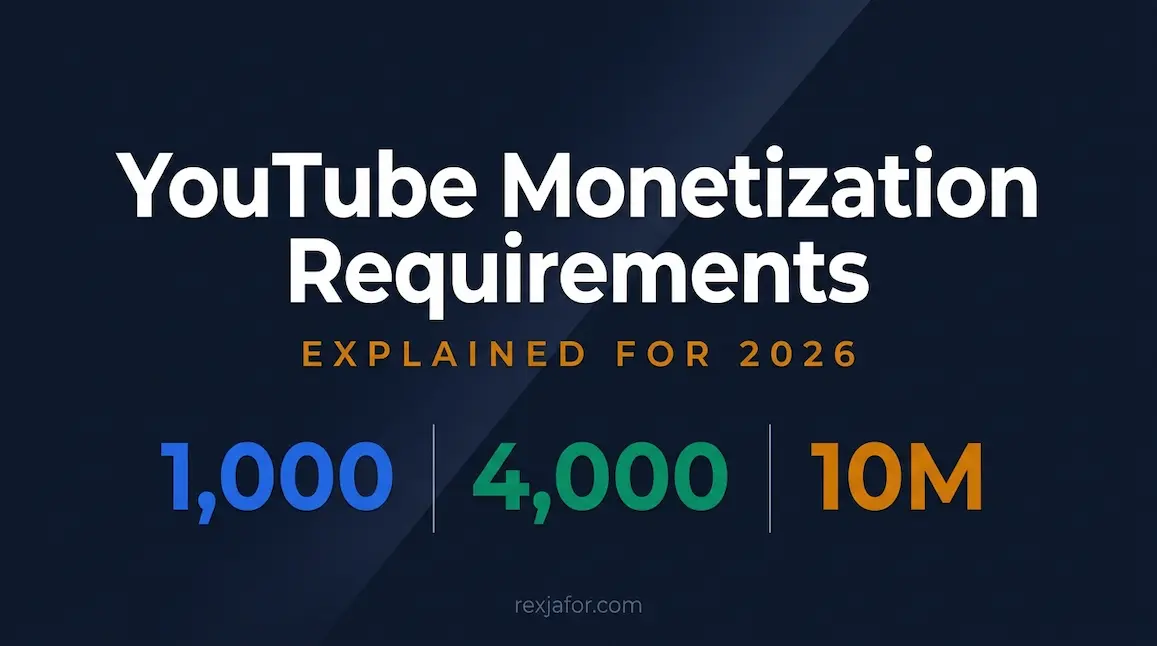
- Bangladesh creators follow the standard YPP route: Bangladesh is not on the list for the 500-subscriber expanded tier, so plan for 1,000 subscribers plus 4,000 watch hours or 10 million Shorts views.
- Rules change on February 1, 2027: new applicants will need 8,000 watch hours or 20 million Shorts views, so start building watch time now.
Can you really run a YouTube channel with just a phone?
Short answer: Yes. The YouTube app lets you create a channel, record and upload videos and Shorts, and go live, while the free YouTube Studio app handles channel details, comments, analytics, and even your Partner Program application. A few tasks are easier in a web browser, but none of them require a computer — you can open YouTube Studio in your phone's browser when you need them.
Here is a realistic breakdown of what a phone handles well and where you will want a workaround:
| Task | Phone-only? | Best tool on your phone |
|---|---|---|
| Create a channel and set your handle | Yes | YouTube app |
| Profile picture, banner, description, links | Yes | YouTube Studio app or YouTube app |
| Record long-form and Shorts | Yes | Phone camera app or YouTube Shorts camera |
| Edit with cuts, captions, music, and text | Yes | CapCut, VN, InShot, or YouTube's built-in editor |
| Custom thumbnails | Yes, after phone verification | Upload screen in the YouTube app or Studio app |
| Go live | Yes, from 50 subscribers | YouTube app (Create button) |
| Apply for the YouTube Partner Program | Yes | YouTube Studio app > Earn |
| Managing ads and some monetization settings after approval | Partly — use Studio in a browser | studio.youtube.com in your phone browser |
What you need before you start
Starting a channel is free. Before you start a YouTube channel with your phone, make sure you have these basics covered:
- A Google Account you control — ideally a fresh Gmail for the channel, with a password you do not reuse anywhere else.
- The minimum age: you must meet Google's minimum age for your country to manage your own account (13 in most countries). You will need to be 18 or older to run your own AdSense account for payouts later.
- A phone with free storage: 10 minutes of 1080p video can easily take over a gigabyte, and editing apps need room to export. Aim for at least 15–20 GB free.
- Your own mobile number for verification — one number can only be linked to 2 channels per year.
- Four free apps: YouTube, YouTube Studio, a video editor (CapCut or VN), and a design app for thumbnails.
- A stable upload connection: Wi-Fi is cheaper and more reliable than mobile data for uploading long videos.
Step 1: Choose your niche and video format
Most phone creators fail before they upload — not because of gear, but because the channel has no clear promise. Before creating anything, write one sentence: "This channel helps [who] do [what]." For example: "This channel helps Bangladeshi students learn freelancing skills with free tools." That sentence will shape your name, your banner, your titles, and the viewers YouTube sends you.
Validate the idea in five minutes: type your topic into YouTube search, look at the autocomplete suggestions, and check whether small channels (under 10,000 subscribers) are getting decent views on those topics. If they are, there is demand you can meet. If you are still deciding, our guide on how to become a content creator in Bangladesh walks through niche selection in more depth.
Next, decide how you will use your phone's two natural formats:
| Shorts | Long-form videos | |
|---|---|---|
| Orientation | Vertical (9:16) or square | Horizontal (16:9) |
| Length | Up to 3 minutes | Any length; over 15 minutes needs phone verification |
| Strength | Fast discovery and reach | Watch hours, search traffic, and loyal viewers |
| Counts toward YPP | Shorts views route (10 million in 90 days) | Watch hours route (4,000 in 12 months) |
| Best for beginners who | Enjoy quick, repeatable ideas | Teach, review, or explain things |
Pro tip: Shorts watch time does not count toward the 4,000 watch-hour threshold, and the two routes never combine. The strongest phone-only strategy is to use Shorts to discover which topics people care about, then turn the winners into longer videos that build watch hours.
Step 2: Create your YouTube channel on your phone
You do not need to switch your browser to desktop mode — that advice is outdated. Use the YouTube app. The steps are the same on Android and iPhone:
1Install and open the YouTube app
Download it from Google Play or the App Store if it is not already on your phone, then open it.
2Sign in with your Google Account
Tap your profile picture in the bottom-right corner (the You tab), then tap Sign in. If you need a new account, tap Add account > Create account and choose personal use or work/business.
3Start channel creation
On the You tab, tap Create a channel. If you do not see it, tap the Create (+) button — YouTube will prompt you to create a channel before your first upload.
4Set your name, handle, and picture
Enter your channel name, pick a unique handle (it becomes your URL, like youtube.com/@yourhandle), and add a clear profile picture.
5Tap Create channel
Your channel is live instantly. You can change the name and handle later, so do not let perfectionism stall you here.
If the option does not appear: Open Chrome or Safari, go to m.youtube.com, sign in, tap your profile picture > Settings > Account > Add or manage channel(s) > Create a channel. This is YouTube's own documented method for the mobile site, and it works without desktop mode.
Personal channel or Brand Account?
A personal channel is tied directly to your Google Account and can only be managed by you. A channel created through Add or manage channel(s) > Create a new channel is connected to a Brand Account, which lets you use a different name from your personal account and add owners and managers later. If you might ever hire an editor, work with a partner, or run the channel as a business, choose the Brand Account route from the start.
Step 3: Verify your channel and secure your account
YouTube uses three levels of feature access. Verifying your phone number takes two minutes and is the single most useful thing you can do on day one:
| Access level | How you get it | What it unlocks |
|---|---|---|
| Standard | Automatic when you create a channel (no active strikes) | Uploading videos and Shorts, playlists, and posts — with lower daily limits |
| Intermediate | Verify your phone number | Videos longer than 15 minutes, custom thumbnails, live streaming from a computer, and creating podcasts |
| Advanced | Sufficient channel history, or ID or video verification | Applying for monetization, Content ID appeals, clickable links in descriptions, chapters, pinned comments, A/B testing, and higher daily limits |
How to verify from your phone: open youtube.com/verify in your phone browser, choose your country, enter your number, and select a text message or voice call. Enter the code you receive. If an SMS is delayed on your operator, request the voice call option instead — YouTube's help pages note that carrier delays are a common cause of missing codes.
Turn on 2-Step Verification now. It is a hard requirement for joining the YouTube Partner Program, and it protects the channel you are about to invest months into. Use Google Authenticator or a passkey rather than SMS alone where possible. For a full security walkthrough, see our guide on what to do if your Gmail is hacked.
Step 4: Brand your channel in the YouTube Studio app
Install the free YouTube Studio app and sign in. Your channel page is the first thing a curious viewer checks before subscribing, so fill in every field:
| Element | What to do | Spec / tip |
|---|---|---|
| Channel name | Short, memorable, and easy to spell. Hint at your topic if you can. | Can be changed later |
| Handle | Match your name and your other social accounts where possible. | Unique across YouTube |
| Profile picture | A clear face photo or simple logo that is readable at tiny sizes. | At least 98 × 98 px, under 4 MB |
| Banner | State your promise and upload schedule. Keep text in the centre so it is not cropped on phones. | At least 2048 × 1152 px, under 6 MB |
| Description | Two or three sentences: who it is for, what they get, how often you post. Use your main keyword naturally. | Visible on your channel page |
| Links and contact email | Add your Facebook page, Instagram, website, and a business email for brand deals. | Shown on your channel page |
You can design the banner and profile picture in Canva on your phone using a YouTube banner template. Keep the design consistent with your thumbnails so viewers recognize your videos instantly in their feed.
Step 5: Film professional-looking videos on your phone
Modern phones — even budget models — shoot sharp video. What separates amateur from professional-looking footage is technique, not megapixels.
Camera settings that matter
- Use the rear camera whenever you can. It is almost always sharper than the selfie camera, especially indoors.
- Record at 1080p, 30fps as your default. It looks great on YouTube, edits smoothly on mid-range phones, and saves storage. Use 4K only if your phone and editor handle it without lag.
- Lock focus and exposure by pressing and holding on your face in the camera app, so brightness does not flicker as you move.
- Turn on the grid and place your eyes roughly one-third from the top of the frame.
- Wipe the lens before every recording — pocket smudges cause the soft, hazy look most people blame on their phone.
- Switch on Do Not Disturb so calls and notifications do not interrupt a good take.
Audio: the upgrade that matters most
Viewers forgive average video, but they click away from echoey or muffled sound. Record in a small room with soft furnishings (curtains, a bed, a sofa), keep the phone within arm's length if you use the built-in mic, and switch off ceiling fans during takes. The best first purchase is a wired lavalier mic that clips to your shirt.
Check your port first: Many newer phones have no 3.5mm headphone jack. If yours only has USB-C, buy a USB-C lavalier mic or a reliable USB-C to 3.5mm adapter that supports microphone input — not every adapter does.
Light: free window light first
Sit facing a window during the day so soft light falls on your face. Never sit with the window behind you — the camera will turn you into a silhouette. A single overhead tube light creates harsh shadows under your eyes; add a table lamp in front of you or invest in a small LED light when you start filming at night.
Budget phone-creator kit in Bangladesh
You can start with nothing but your phone. When you are ready to upgrade, buy in this order:
| Priority | Item | Typical price in Bangladesh | Why it matters |
|---|---|---|---|
| 1 | Wired lavalier mic (e.g. Boya BY-M1 series) | Roughly Tk 900–1,700 | Clearer voice instantly; the biggest quality jump per taka |
| 2 | Phone tripod or tripod-selfie stick | Roughly Tk 850–1,500 | Stable, repeatable framing without asking someone to hold the phone |
| 3 | Small LED or ring light | Varies by size and brand | Lets you film at night and keeps skin tones consistent |
| 4 | Extra storage (cloud or memory card) | Varies | Keeps your phone free for recording and exporting |
Prices are indicative retail listings from Bangladeshi electronics shops and change often — always check current prices and buy original products from trusted sellers.
Step 6: Edit your videos on your phone
Editing is where a raw recording becomes a watchable video. Your goal as a beginner is simple: cut the pauses and mistakes, add captions, and keep the pace moving. Here is how the main free options compare:
| App | Best for | Watch out for |
|---|---|---|
| YouTube app editor | Quick Shorts: trimming, text, filters, and licensed music right before upload | Very basic for long-form videos |
| CapCut | Auto-captions, templates, effects, and fast Shorts editing | Some features and assets require a paid plan; check the licence of any template music |
| VN Video Editor | Multi-track timeline editing for longer tutorials, with no watermark on exports | Slightly steeper learning curve |
| InShot | Simple, beginner-friendly edits and resizing for different aspect ratios | Free version adds a watermark unless removed |
Not sure which to pick? Read our full CapCut tutorial for beginners, the in-depth VN Video Editor review, or our head-to-head InShot vs CapCut comparison.
Music warning: Never add popular songs you do not have rights to. They trigger Content ID claims that can block your video or send its revenue to the rights holder. Use the YouTube Audio Library (in YouTube Studio on the web) or music clearly licensed for YouTube use.
Step 7: Upload and optimize from your phone
In the YouTube app, tap the Create (+) button, choose to upload a video (or create a Short), select your edited file, and fill in the details. Each field is a chance to help YouTube understand and recommend your video:
- Title: put the main keyword near the start and make a specific promise, such as "How to Remove Background Noise in CapCut (Free, 2 Minutes)". Keep it under roughly 60 characters so it is not cut off on phones.
- Description: write two or three natural sentences in the first lines explaining what the video covers, then add useful links. Viewers see only the opening lines before tapping "more".
- Thumbnail: for long-form videos, upload a custom thumbnail (available after phone verification). Use a close-up face, three or four bold words at most, and high contrast. Design it at 1280 × 720 px.
- Audience: you must answer whether the video is made for kids. Answer honestly — it is a legal requirement, not a growth trick.
- Altered or synthetic content: if your video uses realistic AI-generated or altered visuals or voices that could be mistaken for real, turn on the disclosure. Using AI for scripting help, captions, or noise removal does not need it.
- Visibility: publish now, or schedule the video so it goes live at a consistent time each week.
- Playlist: add every video to a playlist from the start so viewers keep watching your content back to back.
Tags play only a minimal role in discovery, so do not spend long on them — your title, thumbnail, and how long people keep watching matter far more. Also note that YouTube's inauthentic content policy (the renamed repetitious content rule) targets mass-produced, templated videos with little human creativity. Faceless and AI-assisted channels are allowed, but each video needs genuine original value.
Step 8: Track performance in YouTube Studio
Open the YouTube Studio app after 48 hours and again after a week. Ignore vanity numbers at first and focus on the three metrics that tell you what to fix:
| Metric | What it tells you | If it is low, fix this |
|---|---|---|
| Impressions click-through rate | How often people click after seeing your thumbnail | Thumbnail and title — make the promise clearer and more specific |
| Average view duration / retention | How long people keep watching | The first 30 seconds — get to the point faster and cut slow sections |
| Returning viewers and subscribers gained | Whether people want more from you | Consistency and niche focus — make a series of related videos |
How to go live from your phone
Mobile live streaming is a great way to build a community once you have a small audience. The requirements from YouTube Help are:
- A verified channel with at least 50 subscribers.
- No live streaming restrictions on your channel in the last 90 days.
- Live streaming turned on — your first stream can take up to 24 hours to become available, so enable it a day early.
To start, open the YouTube app, tap Create (+) > Live, add a title, and go. Channels with between 50 and 999 subscribers may have their mobile live audience limited, and archived mobile streams are set to private by default until you reach 1,000 subscribers. For the most stable stream, use Wi-Fi, keep your phone plugged into a charger or power bank, and mount it on a tripod.
Monetization in 2026: what Bangladesh creators must know
This is where most global guides mislead Bangladeshi readers. YouTube runs two tiers of the Partner Program, but the lower 500-subscriber "expanded" tier is only available in specific countries — and Bangladesh is not on YouTube's current list. That means creators with a channel based in Bangladesh should plan for the standard route:
| Requirement | Until January 31, 2027 | From February 1, 2027 (new applicants) |
|---|---|---|
| Subscribers | 1,000 | 1,000 |
| Long-form route | 4,000 qualified public watch hours in the last 12 months | 8,000 qualified public watch hours in the last 365 days |
| Shorts route | 10 million qualified Shorts views in the last 90 days | 20 million qualified Shorts views in the last 90 days |
| Account requirements | 2-Step Verification, advanced features access, no active Community Guidelines strikes, and one AdSense for YouTube account | Same |
Why this matters for a new phone creator: YouTube announced on August 10, 2026 that the watch-hour and Shorts-view thresholds double for new applicants from February 1, 2027. Channels already in the program are not affected. If you start today, realistic growth probably puts you under the new rules — so build a library of evergreen long-form videos that keep earning watch hours for months, rather than relying on a single viral Short.
A few more essentials:
- You can apply from your phone: in the YouTube Studio app, tap Earn > Apply now, accept the base terms, and set up or link an AdSense for YouTube account. Reviews typically take about a month.
- Only create AdSense inside YouTube Studio when applying, and keep just one active AdSense for YouTube account.
- Stay active: YouTube may turn off monetization on channels that have not uploaded or posted for six months or more.
- Ads before approval earn you nothing: YouTube may show ads on any video, but you only receive a share after you qualify and are accepted.
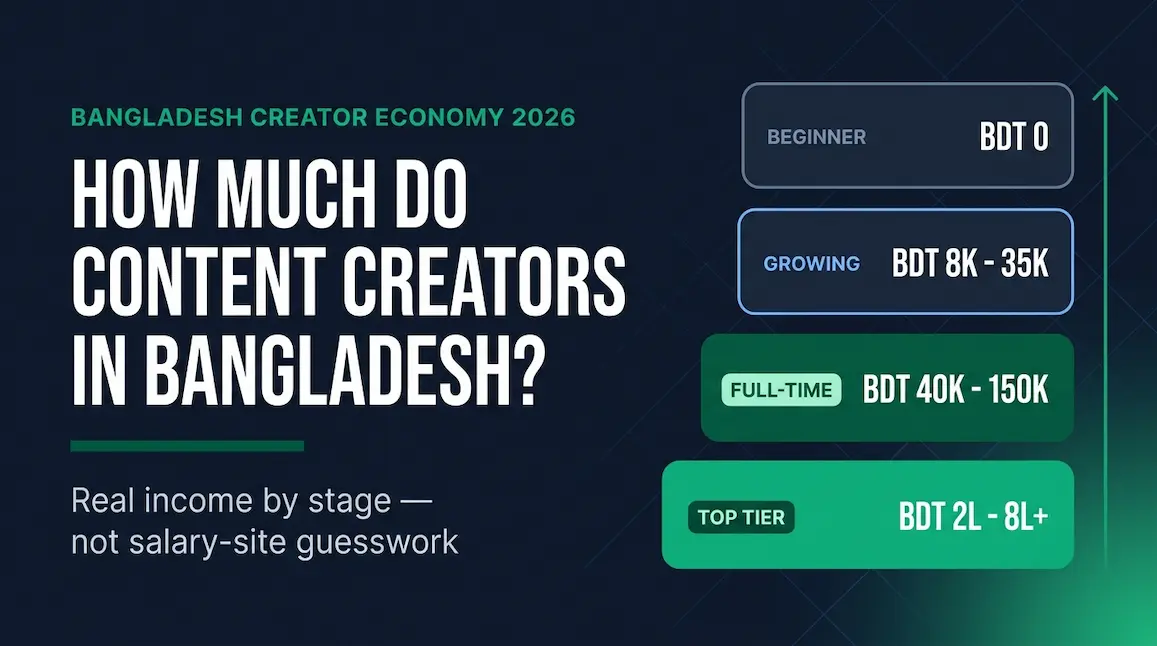
For a full breakdown of thresholds, payouts, and approval tips, read our guide to YouTube monetization requirements, and see how much content creators earn in Bangladesh for realistic income expectations.
What other guides get wrong
We reviewed the pages currently ranking for this topic. Several contain outdated or inaccurate advice that can confuse beginners:
| Common claim | Reality in 2026 |
|---|---|
| You must open YouTube in your phone browser's desktop mode to create a channel. | Not required. You can create a channel in the YouTube app, and YouTube's own help instructions work on the regular mobile site. |
| Verifying your phone number unlocks Content ID appeals and eligibility to apply for monetization. | Phone verification unlocks intermediate features (15+ minute videos, custom thumbnails, podcasts). Content ID appeals and applying for monetization are advanced features that need channel history or ID/video verification. |
| In the YouTube app, tap your profile icon in the top-right corner. | The profile picture (You tab) now sits in the bottom-right corner of the app. |
| Tap the Upload button at the centre of your channel homepage. | Uploads start from the Create (+) button in the app's bottom navigation. |
| YPP requires 1,000 subscribers and 4,000 watch hours — full stop. | There is also a Shorts route (10 million Shorts views in 90 days), and from February 1, 2027 new applicants need 8,000 watch hours or 20 million Shorts views. |
| Anyone can join YPP at 500 subscribers. | The 500-subscriber expanded tier is only available in listed countries, and Bangladesh is not currently one of them. It also unlocks fan funding and Shopping — not ad revenue. |
| Lavalier mics usually cost just over a dollar. | Genuine wired lavalier mics from reputable brands typically cost around Tk 900–1,700 in Bangladesh. Ultra-cheap unbranded mics often sound worse than your phone's built-in mic. |
Common mistakes phone creators make
- Buying gear before posting. Upload your first five videos with what you have. You will learn what you actually need.
- Filming vertical for long-form videos. Vertical videos of 3 minutes or less become Shorts automatically; long-form viewers on TVs and laptops expect horizontal 16:9.
- Using the selfie camera in dim light. It produces grainy, soft footage. Use the rear camera near a window.
- Ignoring audio. Echo and fan noise make people leave faster than any visual flaw.
- Uploading copyrighted music. One claim can block your video or redirect its revenue.
- Skipping verification and 2-Step Verification. You lose custom thumbnails, long uploads, and protection against account takeover.
- Posting randomly across unrelated topics. YouTube struggles to find the right audience for channels with no clear focus.
- Giving up after ten videos. Most channels take months of consistent uploads before growth compounds.
Your first 30 days: a phone-only launch plan
| Week | Focus | Actions |
|---|---|---|
| Week 1 | Set up | Pick your niche sentence, create the channel, verify your phone number, turn on 2-Step Verification, and add your picture, banner, and description. |
| Week 2 | First uploads | Publish your first long-form video and two or three Shorts on the same topic. Focus on clear audio and a strong first 10 seconds. |
| Week 3 | Improve | Check click-through rate and retention in YouTube Studio. Redesign one weak thumbnail and upload your second long-form video. |
| Week 4 | Build a system | Choose a fixed upload day, batch-record two videos in one session, create a playlist, and reply to every comment. |
Frequently asked questions about starting a YouTube channel with a phone
Can I start a YouTube channel with just a phone?
Yes. You can create the channel, film, edit, upload, go live (from 50 subscribers), check analytics, and even apply for the YouTube Partner Program entirely from an Android phone or iPhone using the YouTube and YouTube Studio apps.
Is it free to create a YouTube channel?
Yes, creating a channel is completely free. All you need is a Google Account. Optional costs come later, such as a lavalier mic, a tripod, or paid features in editing apps.
Do I need desktop mode to create a YouTube channel on mobile?
No. That advice is outdated. Create the channel in the YouTube app, or use m.youtube.com in your normal phone browser through Settings > Account > Add or manage channel(s).
Which phone is best for starting a YouTube channel?
Any phone that records clean 1080p video with a stable rear camera is enough to start. Good audio, lighting, and editing matter more than the phone model. Upgrade only when your phone clearly limits you, such as lag while editing or poor low-light footage.
How do I add a custom thumbnail from my phone?
First verify your phone number to unlock intermediate features. Then, when uploading a video in the YouTube app or editing it in the YouTube Studio app, tap the thumbnail option and choose an image from your gallery.
How many subscribers do I need to go live on my phone?
You need at least 50 subscribers and a verified channel to live stream from the YouTube app. Until you reach 1,000 subscribers, your mobile live audience may be limited.
Can I get monetized in Bangladesh with a phone-only channel?
Yes. The device does not matter — the thresholds do. Bangladesh creators currently need 1,000 subscribers plus 4,000 watch hours in 12 months or 10 million Shorts views in 90 days. From February 1, 2027, new applicants need 8,000 watch hours or 20 million Shorts views.
How long does it take to grow a YouTube channel from a phone?
There is no fixed timeline. Channels that post consistently in one clear niche, improve thumbnails and retention based on analytics, and make videos people search for usually grow faster than channels that post randomly.
Can I use AI tools in videos made on my phone?
Yes, but disclose realistic altered or synthetic content when you upload, and make sure every video adds your own original value. YouTube's inauthentic content policy targets mass-produced, templated uploads, not creators who use AI as a helper.
Final thoughts: your phone is already a studio
Starting a YouTube channel with just a phone is no longer a compromise — it is how many successful creators begin. Create the channel in the app, verify it, secure it, fix your audio and light, edit tightly, and publish consistently. Learn from your analytics every week. With monetization thresholds rising in 2027, the best time to start building watch hours is today, with the device you already own.
Ready to go further? Explore our Personal Branding & Creator Economy hub for more guides on growing, editing, and earning as a creator.